Integrating Metalia: A Practical Guide to Using This Handwritten Font in Your Design Workflow
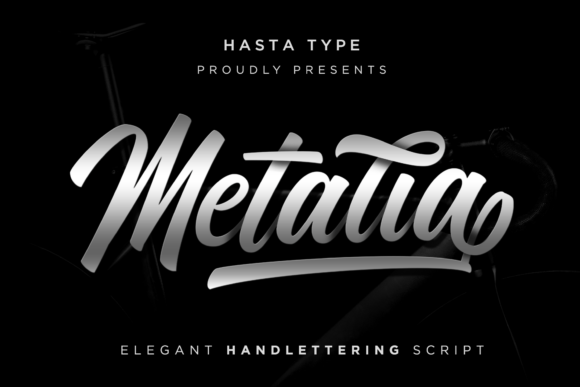
In the landscape of modern design, typography is rarely just about picking a font that looks nice. It is a functional decision that affects readability, brand perception, and the overall efficiency of your creative process. When you introduce a typeface like Metalia—a modern, classy handwritten font—into your toolkit, you are adding a specific asset that serves a specific purpose. Metalia is designed to bring elegance and style without sacrificing legibility, but to get the most out of it, you need to understand how it fits into your broader workflow, from initial concept to final execution.
This guide is not about hype or vague inspiration. It is a practical look at how to plan for, implement, and manage a distinct handwritten font like Metalia within professional and personal projects. Whether you are a freelancer building client identities, a marketer designing social assets, or a small business owner preparing for a product launch, understanding the role of this typeface will help you work more efficiently and achieve more consistent results.
Understanding Metalia's Place in Your Typographic Toolkit
Before you even open your design software, it helps to classify the tools you are about to use. In a well-organized font library, typefaces are often categorized by function: serif for long-form reading, sans-serif for clean interfaces, monospace for code, and script or handwritten for accents. Metalia falls squarely into the accent category. It is a modern handwritten font, meaning it has the warmth and personal touch of handwriting but with the clean curves and consistency needed for digital and print reproduction.
Think of it as a specialty tool. You would not use a chisel for every task in a woodshop; similarly, you would not use Metalia for body copy in a 500-word blog post. Its strength lies in headlines, pull quotes, logos, and call-to-action text where personality and elegance are paramount. Recognizing this upfront saves time during the design phase and prevents the common mistake of forcing a decorative font to do a job it was not built for.
Preparation: Licensing, File Management, and Compatibility
A smooth workflow begins long before the creative spark. Practical preparation with Metalia involves three key areas: licensing, file organization, and technical compatibility.
Licensing and Usage Rights
First, confirm the licensing terms. Whether you purchased Metalia from a marketplace or received it from a client, understand if the license covers your intended use—desktop, web, digital products, or merchandise. Document this. Keep the license file or receipt in the same folder as the font files. This is not just about legal compliance; it is about efficiency. When a client asks for usage rights six months later, you will have the answer immediately.
File Management
Create a dedicated folder for Metalia within your font library. If you work across multiple devices or with a team, use a cloud service or a font management tool like Adobe Fonts, FontBase, or Suitcase Fusion to sync the font. Proper organization prevents the "missing font" error that can halt a project and waste hours of troubleshooting.
Technical Compatibility
Test the font in the primary software you use. Does it render well in Adobe Illustrator for logo work? Does it maintain its elegance in Figma for UI mockups? Does it convert cleanly to outlines for print? Running a quick compatibility check at the start of a project is a small step that prevents major headaches during the final export.
Workflow Integration: When and Where to Use Metalia
The real value of Metalia is revealed when you integrate it intentionally into your process. Here is how it can be applied before, during, and after key project stages.
Before a Project: Planning and Concept Development
During the mood board or concept stage, Metalia can be used to quickly visualize a brand's personality. If a client describes their brand as "elegant, approachable, and modern," drop Metalia into a sample logo or headline layout alongside a neutral sans-serif. This gives everyone a tangible reference point early on, aligning expectations and reducing revisions later. It acts as a visual shorthand for the intended tone.
During a Project: Execution and Design Systems
When you are deep in execution, consistency is key. Metalia should be part of a defined type system. Pair it with a clean, geometric sans-serif like Montserrat or a classic serif like Playfair Display for contrast. Use it for specific elements:
- Logo and Wordmarks: Its elegant curves make it suitable for boutique brands, wedding studios, or creative agencies.
- Headlines and Subheadings: Use it for the main title of a poster or social media graphic to draw the eye.
- Quotes and Pull-Outs: In a magazine layout or blog design, a quote set in Metalia can break up text and add visual interest.
- Call-to-Action Text: On a website or flyer, phrases like "Shop Now" or "Learn More" in Metalia can feel more personal and inviting.
The rule of thumb is to use it sparingly. Overusing a handwritten font can clutter a design and reduce its impact. Think of it as an accent color, not the base coat.
After a Project: Quality Control and Long-Term Use
Once the design is complete, Metalia plays a role in quality control. Before sending files to print or publishing a website, check the following:
- Outlining: Convert all text to outlines in vector files to avoid missing font issues at the print shop.
- Web Embedding: If using Metalia on a website, use the provided webfont files (WOFF, WOFF2) and test loading speed. Handwritten fonts can be heavier than system fonts, so optimization matters.
- Brand Guidelines: If this is for a client, document Metalia's usage rules in the style guide. Specify when to use it, what sizes are appropriate, and what it should be paired with. This ensures the brand remains consistent long after you hand off the files.
Practical Implementation Tips and Observations
Working with a font like Metalia requires a bit of finesse. Here are some practical tips to ensure it enhances your work rather than complicates it.
Pairing for Contrast and Readability
The most effective pairings create a clear hierarchy. Metalia works best when contrasted with a highly legible, neutral font. For example, use Metalia for a wedding invitation header and a clean sans-serif like Lato for the event details. The handwritten font draws attention, while the sans-serif ensures the logistical information is easy to read.
Size and Spacing Considerations
Handwritten fonts often require more careful attention to size and letter-spacing (tracking). Metalia may look stunning at 48pt for a headline but become difficult to read at 12pt for a subheading. Always test at the intended size. Additionally, you may need to adjust the tracking slightly to prevent letters from feeling too cramped, especially in all-caps usage.
Color and Context
Elegance is often conveyed through restraint. Use Metalia in a limited color palette—perhaps a single accent color against a neutral background. Avoid pairing it with overly busy patterns or multiple competing colors, which can dilute its sophisticated effect.
Conclusion: A Strategic Tool, Not a Default
Integrating Metalia into your workflow is about understanding its strengths and applying it with intention. It is not a font for every occasion, but when used correctly, it elevates a design from functional to memorable. By preparing your files properly, defining its role in your type system, and applying it consistently across projects, you turn a beautiful font into a reliable, efficient tool. The goal is to let Metalia do what it does best—add a touch of modern elegance—while your overall design system handles the heavy lifting of communication and clarity.